Platform capabilities

Built for the workflows you do every Tuesday.

CanineOps covers booking, intake, boarding, training, communication, billing, and reporting in one coherent workflow layer, with role-based context that keeps complexity controlled as you grow.

All core workflows in one productRole-based access for cleaner executionNo artificial gatekeeping of key operational features

Frontline speed

Reduce shift friction with clear queues and role-specific context.

Client trust

Deliver timely updates without exposing internal operational noise.

Leadership control

Turn daily execution data into same-week operational decisions.

Operations foundation

The workflows your team uses every day.

Booking & Calendar

Multi-location availability, service templates, approval workflows, overbooking prevention, waitlist management, and client self-service booking 24/7.

  • Real-time availability across locations
  • Custom service templates
  • Automated approval workflows
Learn more

Boarding Operations

Check-in/out workflows, stay management, kennel assignments, daily care notes, feeding logs, pet photos, and real-time client updates.

  • Streamlined check-in/out
  • Kennel assignment & tracking
  • Daily care notes & photos
Learn more

Training Programs

Program milestones, trainer session notes, skill tracking, progress documentation, outcome tracking, and professional report cards.

  • Program milestones & tracking
  • Trainer session notes
  • Report card generation
Learn more

Pet Records & CRM

Complete pet profiles, vaccination records, medical history, client household management, behavior notes, preferences, and communications timeline.

  • Comprehensive pet profiles
  • Vaccination & medical tracking
  • Client household management
Learn more

Report Cards & Docs

Professional report card templates, document storage, signed agreements, custom documentation, intake forms, and compliance record keeping.

  • Professional report cards
  • Document storage & retrieval
  • Compliance documentation
Learn more

Notifications & Alerts

SMS & email notifications, alerts for approvals/bookings, client status updates, staff notifications, and customizable notification preferences.

  • SMS & email notifications
  • Custom alert rules
  • Real-time status updates
Learn more

Client experience

Visibility that builds trust without exposing internal chaos.

Client Portal

Secure web portal for clients to view pets, read stay updates, download report cards, view invoices, and manage preferences. Mobile-first design.

  • Secure pet status access
  • Report cards & documentation
  • Invoice & payment history
Learn more

Communications

Built-in messaging, email templates, SMS capabilities, communication history, and organized client interactions timeline.

  • Built-in messaging system
  • Email & SMS templates
  • Communication timeline
Learn more

Photos & Media

Upload and organize photos from boarding/training stays. Share with clients through portal. Storage management and media organization.

  • Photo uploads & organization
  • Client-accessible media
  • Cloud storage included
Learn more

Revenue + reporting

Use recorded operations to drive closeout and decision-making.

Billing & Invoicing

Service-linked invoices, custom line items, payment tracking, recurring billing setup, and revenue reporting. You keep 100% of revenue.

  • Automated invoicing
  • Custom service rates
  • Payment tracking & history
Learn more

Analytics & Reporting

Revenue dashboards, operational metrics, staff performance reports, capacity utilization, and custom report generation.

  • Revenue dashboards
  • Operational metrics
  • Custom report builder
Learn more

Scale + organization

Grow without rebuilding your operating model every time complexity increases.

Multi-Location Management

Unified dashboard for multiple facilities. Location-scoped staff views. Consolidated reporting. Add unlimited locations.

  • Unified multi-location dashboard
  • Per-location staff assignment
  • Consolidated reporting & billing
Learn more

Role-Based Access Control

Pre-built roles (Admin, Manager, Trainer, Staff, Client) with custom permissions and complete audit visibility.

  • Pre-built role templates
  • Custom permissions
  • Audit logging & compliance
Learn more

You keep 100% of your payments.

CanineOps is a flat subscription. Your clients pay you through your own payment processor. We do not take a percentage, force a gateway, or hide the economics in fine print.

See it in practice

Product visuals grounded in operational reality.

Use these previews to understand how the platform feels across different jobs-to-be-done, not just what icons appear on a page.

app.canineops.com/dashboard
Live
Shift control panel
North Campus Operations
1 critical alert · 2 pending handoffs
Occupancy82%32 units · 5 intake-ready
Check-in queue6Next arrival 3:00 PM
Client updates413 awaiting manager approval
Departure billing$6.4k6 pickups pending closeout
Live workflow activity
Front desk, kennel, trainer, and billing queues
Updated 14s ago
Buddy checked into K-02
Front desk verified vaccines and feeding instructions
09:18
Medication handoff needs trainer confirmation
Luna · noon dose still unacknowledged
11:24
Invoice ready for pickup
Closeout packet prepared for Atlas departure
14:06
Capacity by area
See pressure before the floor gets noisy.
Small dog wing94%
Large dog wing78%
Training suites66%
Readiness
Boarding board, staffing, and client updates all green for afternoon intake.
Operations Dashboard Real-time overview across all your locations
app.canineops.com/boarding/board
Live
Kennel board
32 units · 27 occupied · 5 ready for intake
Filtered by Today
K-02
Buddy
Check-in complete · meds logged
T-04
Luna
Training block at 11:30
K-07
Atlas
Client update approved
K-08
Available
Prepared for 3:00 PM arrival
K-11
Rocky
Checkout pending pickup
S-02
Milo
Feeding confirmed
S-03
Available
Deep cleaned at 10:15
K-14
Bella
Care escalation note
Arrival queue
Maple · 3:00 PM
Vaccines confirmed · bath add-on
Scout · 4:15 PM
Board & Train intake · trainer assignment pending
Ops notes
  • • Shift handoff completed for kennel wing A.
  • • Two client update drafts awaiting approval.
  • • South location occupancy forecast at 88% tomorrow.
Boarding Operations Kennel grid with live occupancy and care notes
app.canineops.com/training/programs
Live
Active training programs
Buddy · Board & Train
Week 2 of 3 · Recall + leash pressure
Luna · Puppy foundations
Socialization checkpoint this afternoon
Atlas · Private sessions
Outcome review ready for owner call
Buddy · Week 2 progress
Trainer: J. Martinez · 9 sessions recorded
64%
Loose leash
Completed
Recall
In progress
Distraction proofing
Upcoming
Session notes
Recall drills improved with long-line distance and lower distraction.
Owner handoff guidance drafted for weekend pickup.
Report card preview
Outcome summary
Recall response improving under moderate distraction
Next focus: handler consistency and threshold proofing.
Training Management Training programs, milestones, and session notes
app.canineops.com/reports/occupancy
Live
Multi-location occupancy overview
Forecast pressure across all active campuses
Main campus91%
North location74%
Training lodge62%
Upcoming demand
Friday and Saturday are trending near capacity. Staffing and pickup workflows should be adjusted before noon.
Reporting & Analytics Revenue, occupancy, and operational forecasts
portal.canineops.com/pets
Live
S
Sarah's portal
1 active stay · 2 upcoming bookings
Buddy
Boarding · Day 3 of 7
Luna
Training progress available
Latest update timeline
Morning check complete
Breakfast, potty, and playtime all logged.
Training note published
Recall drills improved with lower leash pressure.
Invoice preview ready
Pickup summary and final total visible before checkout.
Client Portal Clients track their pets in real time
app.canineops.com/frontline
Live
Frontline mobile
Assigned queue for current shift
Buddy
Medication check complete
Luna
Training block in 30 min
Atlas
Pickup paperwork ready
Mobile Frontline View Staff checklists and tasks on any device

Workflow stories

From feature list to operational outcomes.

Connected tools matter because disconnected work breaks trust, efficiency, and visibility.

Scheduling Workflow

Booking request to confirmed plan

Keep intake smooth while protecting kennel capacity and staff bandwidth.

  1. 1 Intake

    Request captured

    Client submits booking request through portal or front desk intake.

  2. 2 Planning

    Capacity checked

    Calendar validates occupancy and service availability by location.

  3. 3 Ops

    Staff aligned

    Team sees upcoming arrivals and required prep tasks before check-in.

  4. 4 Client

    Confirmation sent

    Client receives status and next instructions automatically.

Reporting Workflow

Daily execution to management insight

Turn frontline updates into decisions leadership can act on the same day.

  1. 1 Capture

    Events logged during shifts

    Check-ins, notes, services, and invoices are recorded as work happens.

  2. 2 Aggregate

    Metrics aggregate automatically

    Dashboard summarizes utilization, revenue, and service delivery.

  3. 3 Insight

    Bottlenecks identified

    Managers spot occupancy pressure, staffing gaps, or delayed tasks quickly.

  4. 4 Action

    Operational adjustments applied

    Teams update staffing, pricing, or process before issues compound.

Media + tours

Visual proof and guided understanding.

These sections deepen trust by pairing product visuals with context about how work actually moves through the platform.

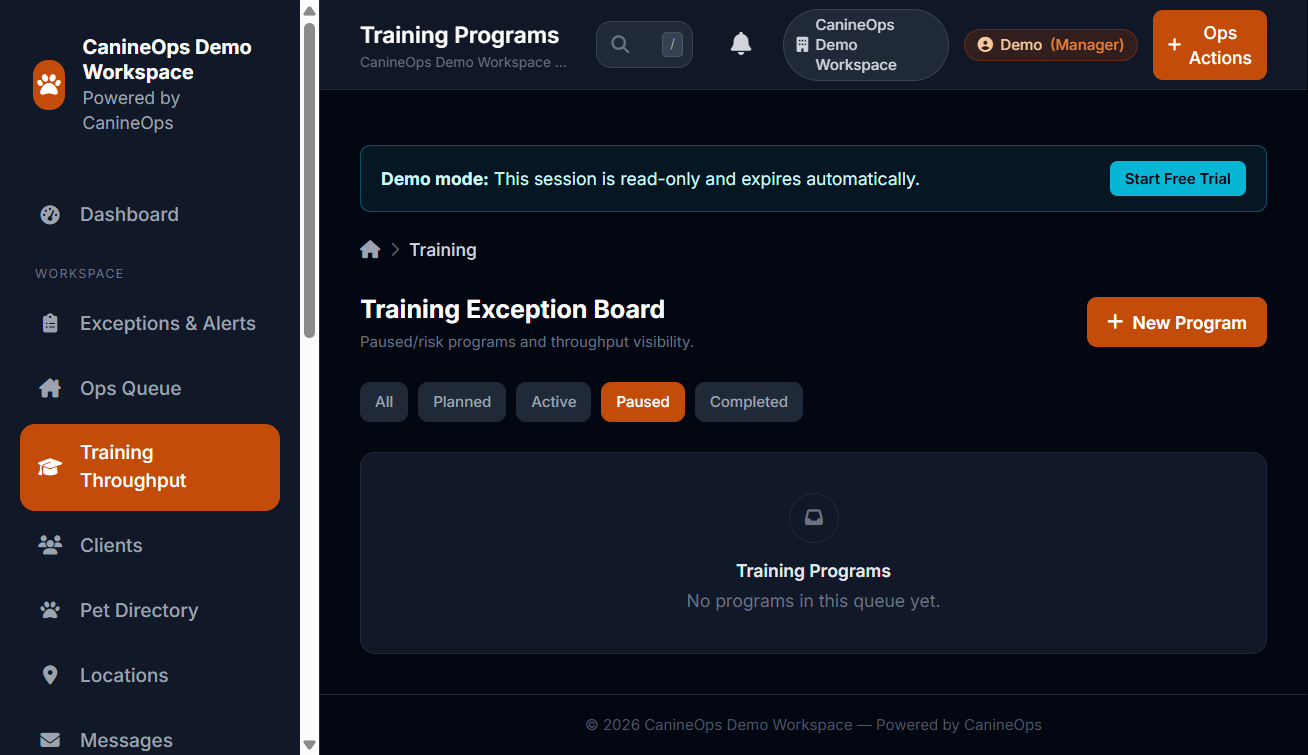
Training Log

Captured from live demo session
Training log with milestones and session outcomes
Target capture: milestone progression, trainer notes, and completion status from live data.

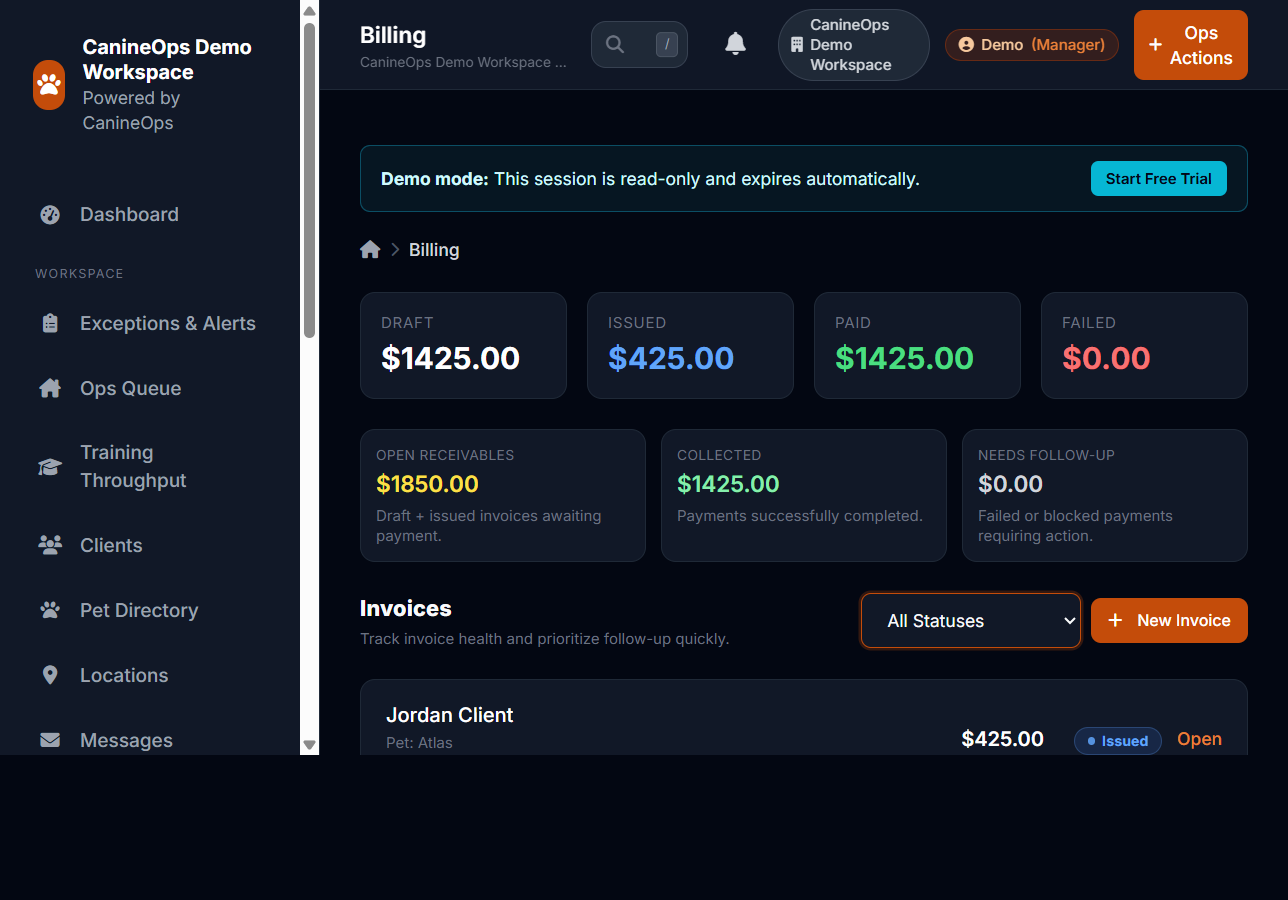
Billing + Reporting

Captured from live demo session
Billing and reporting view with invoices and KPI summary
Target capture: invoice workflow and operational reporting in a single operator workflow.

Interactive tour

Onboarding workflow walkthrough

Understand how a new team reaches operational readiness without platform overload.

Step 1

Configure workspace and locations

Define your facility profile, role boundaries, and service structure first.

Operator view: Admin setup views
Step 2

Import clients and pet records

Move from spreadsheets into a centralized operating record for staff and trainers.

Operator view: Client and pet record imports
Step 3

Apply booking and capacity rules

Set approvals, availability, and safeguards to prevent scheduling friction.

Operator view: Calendar and policy controls
Step 4

Run first operational week

Use guided flows for check-ins, care execution, updates, and checkout billing.

Operator view: Daily execution dashboards

Interactive tour

Scale and leadership visibility tour

See how local execution and centralized leadership insight can coexist cleanly.

Step 1

Scope access by role and location

Teams get only the context they need for their daily responsibilities.

Operator view: Role-permission model
Step 2

Execute frontline tasks by site

Staff can focus on local workload without cross-location noise.

Operator view: Location-scoped queue views
Step 3

Aggregate operational KPIs

Leadership tracks occupancy, throughput, and service quality trends.

Operator view: Cross-location reporting
Step 4

Apply process and staffing updates

Operational decisions are grounded in recorded data instead of guesswork.

Operator view: Planning and optimization decisions

Next step

Ready to validate fit in a realistic environment?

Use the demo to test operational flow, then start a trial when you’re ready to configure your own process, staff roles, and locations.

No credit card required. Full feature access for 7 days.