Interactive product evaluation

See real workflows before you commit to a rollout.

This demo is built for operators who need proof: realistic boarding, training, client communication, scheduling, and billing flows in a safe read-only environment.

Read-only for safe explorationRealistic sample data for believable workflowsLive walkthroughs available for operational Q&A
portal.canineops.com/pets
Live
S
Sarah's portal
1 active stay · 2 upcoming bookings
Buddy
Boarding · Day 3 of 7
Luna
Training progress available
Latest update timeline
Morning check complete
Breakfast, potty, and playtime all logged.
Training note published
Recall drills improved with lower leash pressure.
Invoice preview ready
Pickup summary and final total visible before checkout.
Demo preview A believable demo should show both operator workflows and the client-facing experience.

Option 1

Book a live walkthrough

Get direct answers on workflow fit, rollout risk, and role setup for your specific operation.

  • 15–30 minute live session
  • Tailored to boarding, training, rescue, or multi-location operations
  • Ideal for owners, managers, and decision-makers
  • Best if you want guided answers fast
Book walkthrough

What to evaluate

Product depth

Look for believable workflows across intake, care, training, reporting, and client visibility — not just isolated screens.

How to compare

Operational fit

Ask whether your team could actually run a day on this system without reverting to side spreadsheets and messaging chaos.

Decision outcome

Rollout confidence

Use the demo to decide whether to book a walkthrough, ask about founder access, or start a 7-day trial.

Get your demo access

Complete this short form to launch a temporary, read-only demo session with realistic sample data.

Expectation: this creates a temporary, read-only demo environment for evaluation. Use a monitored business email so follow-up guidance reaches the right operator.

What happens next

  1. 1

    Submit the form

    Creates your temporary, read-only demo session instantly.

  2. 2

    Explore workflows

    Walk through realistic boarding, training, and billing flows.

  3. 3

    Start your trial

    Move to a 7-day trial when you're ready to configure your own setup.

1

Contact Details

2

Service Context

3

Confirm Demo Mode

Read-only for integrity: demo sessions preserve shared sample data while still letting you inspect major workflows safely. Access remains temporary so the experience stays fresh and controlled.

Demo credentials will be sent to your email immediately

Recommended evaluation path

Follow the workflows in the right order.

This path helps evaluators see how bookings, care execution, training, reporting, and client visibility fit together in under 20 minutes.

Demo Path

20-minute walkthrough path

Designed to reduce overwhelm and show exactly how workflows connect.

  1. 1 3 min

    Dashboard first

    Review today's occupancy, check-ins, and revenue snapshot.

  2. 2 5 min

    Boarding board

    Inspect kennel assignment, care notes, and active-stay progress.

  3. 3 4 min

    Training log

    Open milestones, trainer notes, and outcome documentation.

  4. 4 8 min

    Reports + next step

    Validate KPI visibility, then move to free trial for your own setup.

What you’ll see

A demo that looks like a real operating environment.

Booking + intake

Capacity, approvals, and arrival planning with real operational context.

Boarding execution

Kennel status, care notes, and assignment clarity for the frontline team.

Training progression

Milestones, session documentation, and outcome-ready progress records.

Client visibility

A separate portal experience that builds trust without exposing internal operations.

Billing + closeout

Invoice readiness grounded in real work records, not memory and cleanup.

Role-based context

Different users see the right information so complexity stays controlled.

Conversion depth

Know what you’ll explore before you ever log in.

These media slots and first-session guidance make the demo feel intentional, trustworthy, and easy to evaluate.

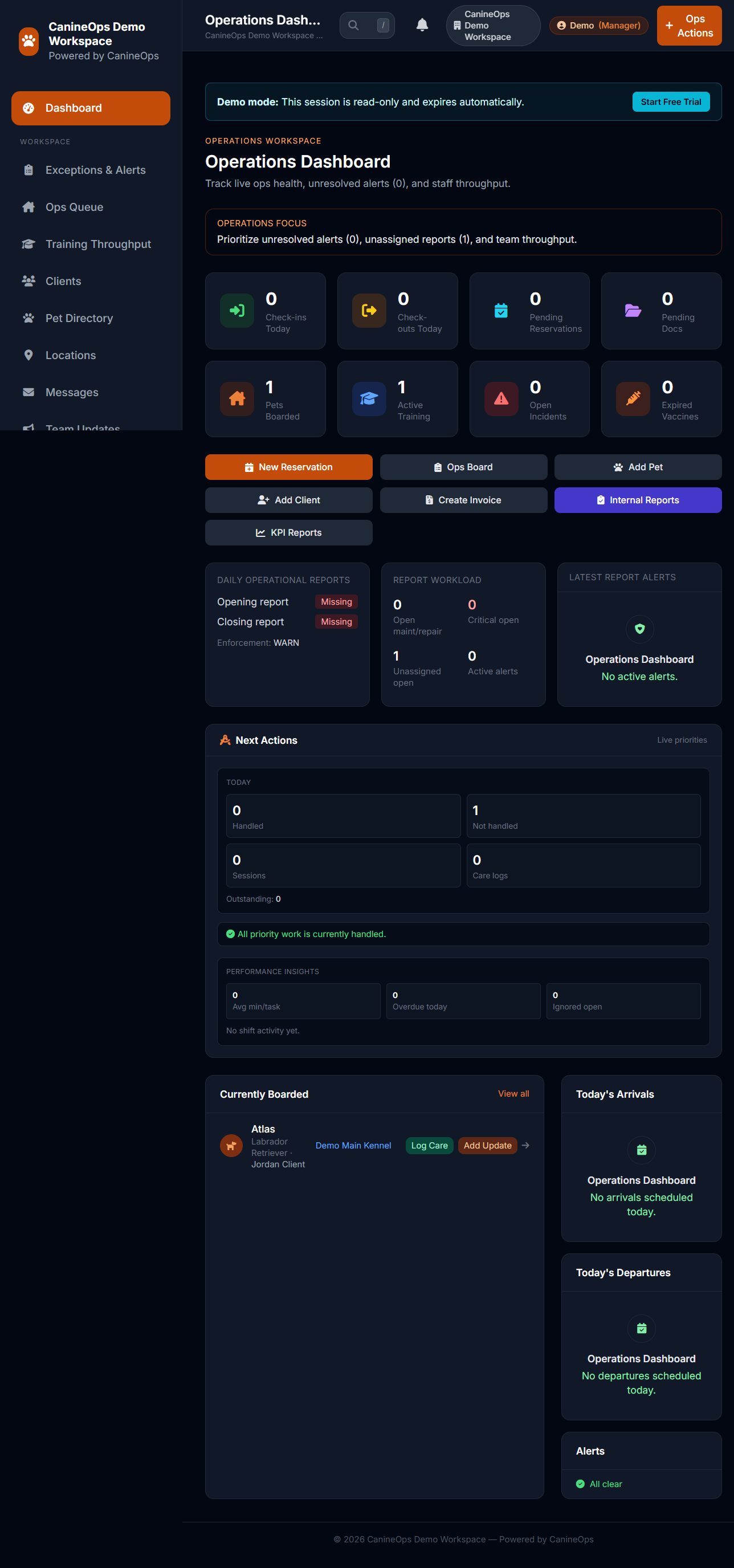
Demo dashboard orientation

Captured from live demo session
Demo dashboard orientation screen
Target capture: where to begin, what to read first, and how to navigate to boarding and training views.

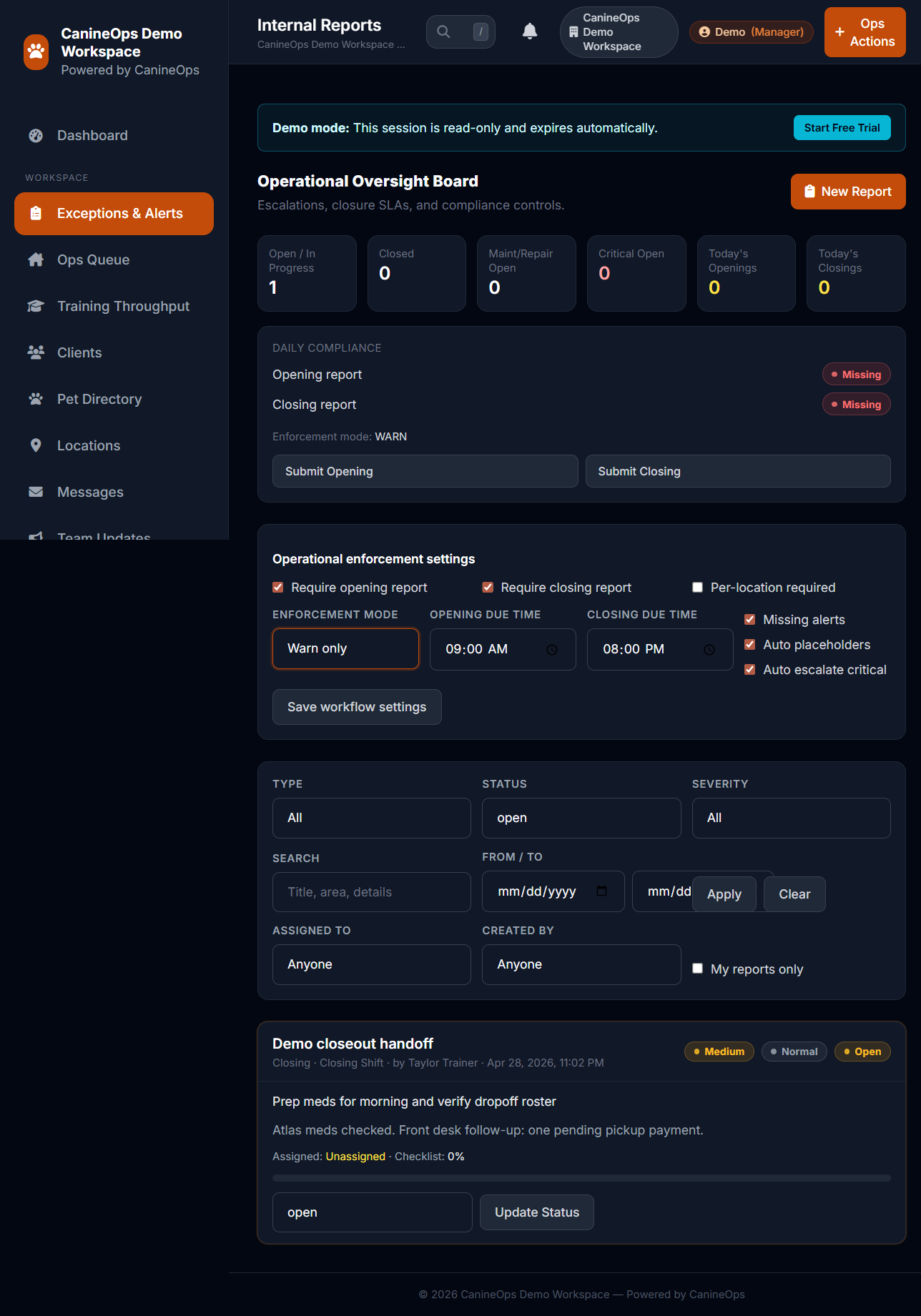
Demo reporting closeout

Captured from live demo session
Demo reporting and next-step screen
Target capture: reporting view used to evaluate fit before starting a personalized trial workspace.

First-session tour

Your first 20 minutes in the demo

Use this sequence to avoid guesswork and evaluate CanineOps quickly with operational context.

Step 1

Open dashboard and read priorities

Start with occupancy and open-action context to understand current operational state.

Operator view: Dashboard summary widgets
Step 2

Inspect boarding assignments

Review active stays, care notes, and assignment flow to gauge frontline usability.

Operator view: Boarding board and active stay records
Step 3

Check milestone progression

Confirm how training outcomes and session evidence are documented per program.

Operator view: Training timeline and outcomes
Step 4

Review reports and next steps

Use reporting visibility to decide whether to start a full trial with your own configuration.

Operator view: Reporting and follow-up actions

Need help deciding?

Talk through your workflow before you invest time.

If you want a live walkthrough, founder-program details, or rollout guidance, we’re happy to help you pressure-test fit.